Attendance

Tracking Daily Absences, Per-Subject Class Attendance, and Parent Notifications Across Every Grade

Take Attendance in a Click, Not on Paper

SCL Attendance gives your school one place to record who is in class and who is not, every day of the year. Homeroom teachers mark daily attendance for their class, subject teachers keep per-subject class attendance, and administrators can log an absence for any date. Parents and students follow every record from the mobile app.The daily routine is built for speed. A homeroom teacher opens their class and marks a student present or absent in a single click, or marks the whole class at once and adjusts the few exceptions. Subject teachers work across a weekly grid, recording Absent, Excused, or Late and moving straight on to the next lesson.Around that routine, SCL keeps everyone informed. A compliance tracker shows leaders which classes still owe attendance, absence reports break the numbers down by grade, and a daily notification keeps parents aware of every absence against the school's limit. Nothing slips through, and no one has to chase it on paper.

How Attendance Works

01

Daily Homeroom Attendance

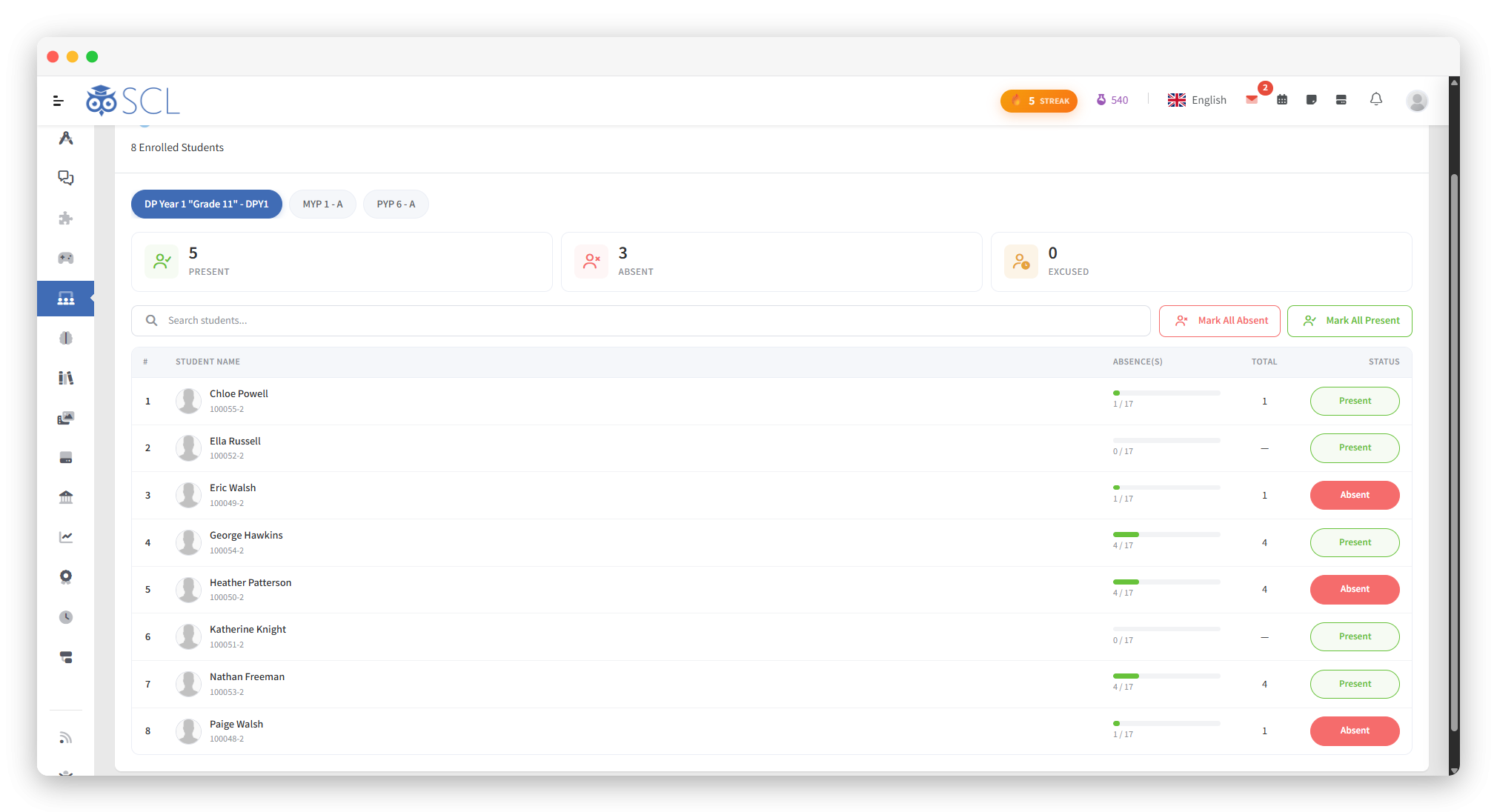
Homeroom teachers open their class and toggle each student present or absent for the day in a single click. Live counts of present, absent, and excused update as they mark, so the register is done in seconds.
02

Mark the Whole Class at Once

One action marks an entire class absent, or clears the day's absences, while leaving already-excused students untouched. Teachers record the exceptions instead of ticking every name, which turns a full class into a few clicks.
03

Per-Subject Class Attendance

Subject teachers record attendance for their own lessons in a weekly grid, marking each student Absent, Excused, or Late. They can move between weeks at any time to review or correct a past session.
04

Absences for Any Date

Administrators add an absence for a single day, or a full range of dates, straight from a student's profile. Every record can be edited or removed later, so corrections never mean starting over.
05

Excuse Types You Define

Each school builds its own list of excused-absence categories, such as medical or permission, and decides which ones appear on the report card. Every absence is then logged against the reason that fits.
06

Automatic Late in Virtual Classes

When a student joins a virtual classroom later than the time limit the school sets, SCL marks them late in class attendance automatically. Online lessons keep an accurate record with no extra effort from the teacher.
SCL homeroom attendance screen where a teacher marks each student present, absent or excused, with present, absent and excused totals, per-student absence counts, and Mark All Present or Absent buttons.

Oversight, Alerts, and Control

07

Absence Reports and Overview

Absence reports break the numbers down by grade and date range, and a dashboard overview charts the school's recent absences at a glance. Leaders see patterns forming instead of waiting for the term to end.
08

Daily Absence Notifications

Each day SCL can notify parents of their child's absence by in-app message and email, with SMS available too. The message shows the day's absence against the school's maximum, so families always know where they stand.
09

Teacher Compliance Tracking

SCL records which homeroom classes have had attendance taken each day and which are still outstanding. Coordinators and administrators see the gaps in one report and follow up before missing marks pile up.
10

Attendance Policies and Windows

Administrators set the maximum absence days, choose which notification channels are active, and can limit the hours when teachers are allowed to register absences. Attendance follows each school's own rules and working days.

See It Live

See How Attendance Runs Across Your School

Walk through daily homeroom attendance, per-subject class attendance and the excuse types you define with our team, then see the absence overview, notifications and compliance tracking your leaders get.