
Student Information System for International Schools

One record per student, from the first application to the final transcript

Every Student Record in One System

SCL is a student information system (SIS) built for K-12 international schools. Every child has one record that opens the day their family applies and stays open through every grade, every report card and every transcript you issue after they leave. Because the SIS and the learning management system are one system on one database, a mark a teacher enters in the gradebook, an absence taken in homeroom and a fee a parent pays all land against the same student at the same moment. Nothing is retyped between systems, because there is only one system. Schools across Egypt and the region run American, British, IB and national curricula on SCL, often several of them side by side in one building. What follows is the record every one of those programmes shares.
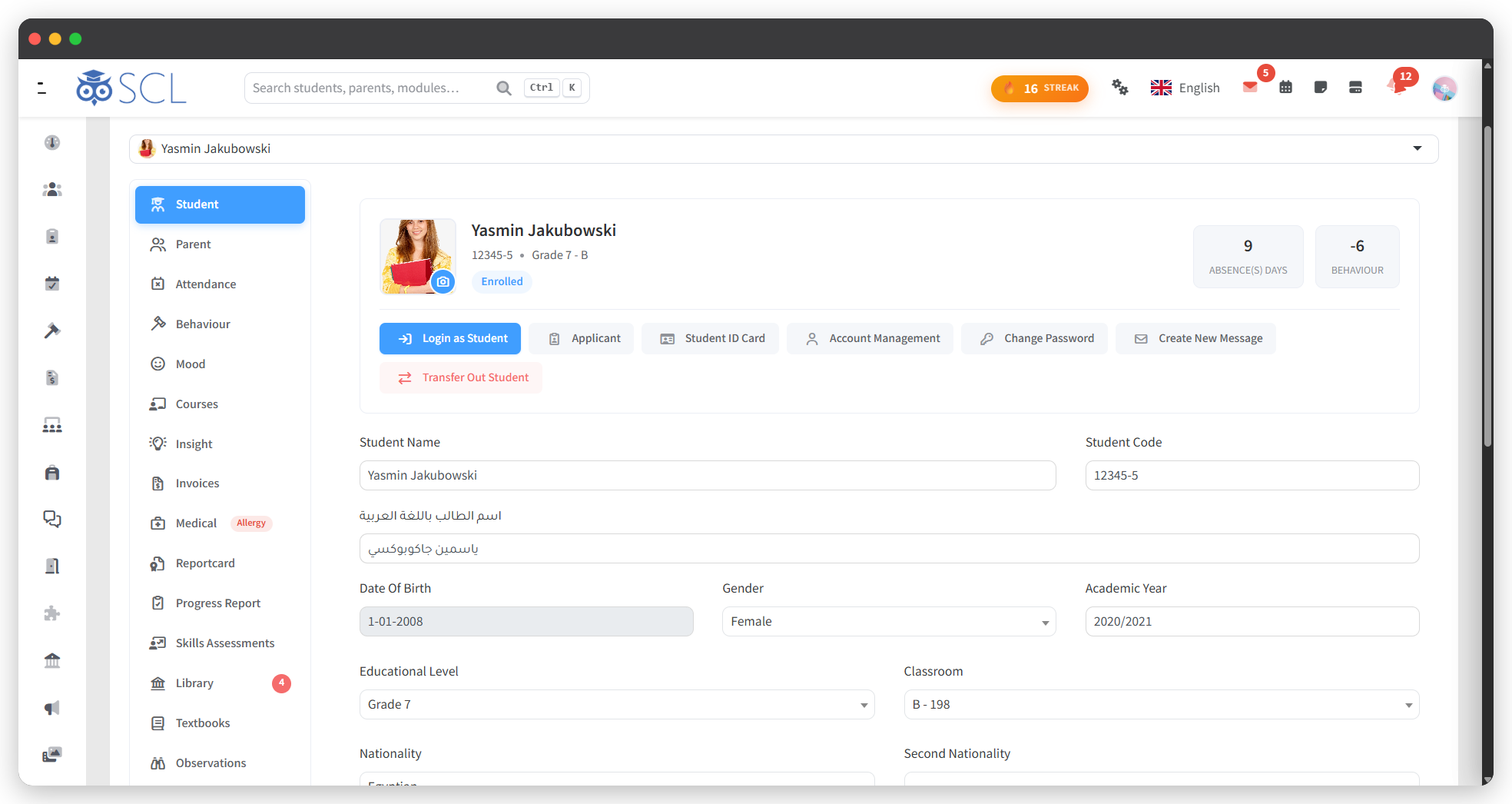
One Record Per Student

01

Student Profiles

Every student has one profile holding their personal details, grade, class and academic history. Each member of staff sees the parts their role allows and nothing beyond it.
02

The Official School Photo

Each student carries an official school photo, uploaded by the school and used across rosters, the gradebook, attendance and reports. It stays separate from any avatar the student sets themselves.
03

Student ID Cards

Generate a printable ID card for any student, carrying their photo and a barcode of their student code. That same code scans at the library circulation desk and the dismissal gate.
04

Guardians and Contacts

Parents and guardians link to the child rather than to a class list, so a family with three children signs in once and sees all three. Contact details update in one place.
05

Course and Class History

The profile keeps every course a student has taken and every class they have sat in, year by year. Move a student between sections and the history follows them.
06

Newcomers and Pseudonyms

Flag a student as a newcomer so staff know their context, or issue a pseudonym where a child's name must not appear in a shared list. Both travel with the record.

Wellbeing, Health and Observation

01

Daily Mood Check-In

Students record how they are feeling each day from their own portal. It takes one click, and it gives a school something a grade sheet will never show it.
02

Mood History and Streaks

Each profile carries a thirty day mood heatmap, the most common mood, and both positive and negative streaks. A run of difficult days becomes visible before anyone thinks to ask.
03

Learning Observations

Teachers log observations against a student across the year, building evidence a single mark cannot carry. Particularly useful in PYP and the early years, where the narrative is the assessment.
04

Medical and Allergy Records

Record allergies, conditions, medication and emergency contacts, with allergy alerts surfacing where staff need them. Parents keep their child's details current from the app. See Clinic.
05

Behaviour on the Record

Merits, demerits and incidents attach to the student, not to a teacher's notebook. Every entry stays on the profile with who logged it and how it was resolved. See Behaviour Management.
06

Clinic Visits

Every visit to the school clinic is logged against the student and visible to the people you allow. Parents see the visits that concern their own child.

From Applicant to Enrolled Student

01

Online Admissions

Families apply online through a form you design, move through four admission phases, book their assessment and pay the application fee. See Admission and Enrollment.
02

One-Click Enrollment

When an applicant is accepted, they become a student without anyone retyping a name, a birth date or a guardian's phone number. The application record becomes the student record.
03

Documents on File

Birth certificates, passports, previous school records and any paperwork your registrar asks for attach to the student's file. They stay with the record instead of a shared drive.
04

Course Registration

Students pick their courses against rules you set by grade, with live seat counts and their timetable in view. See Course Selection.
05

Transport From Day One

Assign a route at admission so a new family's bus place and its fee are settled before term starts. See Transportation.
06

Transfers and Re-Enrollment

Transfer a student out, deactivate their account instantly, or bring a returning student back onto the roll with their history intact. See Registrar.

The Academic Record

01

Attendance

Daily homeroom and per-subject attendance, excuse types you define, and absences that can be entered for any past date. See Attendance.
02

The Gradebook

One gradebook covering percentage, points, letter and criterion grading, with weights set per subject and a live earned grade. See Grading.
03

Report Cards

Templates for American, British, IB PYP, MYP, DP and Egyptian National programmes, generated for a whole quarter at once. See Report Cards.
04

Official Transcripts

Issue a transcript covering every year a student studied with you, combining records across grades, with eligibility rules and signatures the school controls.
05

Progress Reports

Between report cards, teachers publish shorter progress reports so a family is never waiting a full quarter to learn their child has slipped.
06

Skills Assessments

Assess the skills a mark does not capture, under a framework you name yourself. The results sit on the record beside the grades rather than in a separate document.

The School Around the Student

01

Fees and Billing

Tuition instalments, admission fees, store orders and online payment, all charged to the student and visible to their parents. See Billing System.
02

Library Lending

Borrow and return a book straight from the student's profile, with the catalogue, reservations and overdue notices behind it. See Library.
03

Dismissals and Pickup

Early leave requests, authorised collectors nominated per child, and a QR pickup pass scanned at the gate. See Dismissals.
04

Timetable

One weekly schedule every student, parent and teacher can see, built in aSc TimeTables and imported to SCL. See Timetable.
05

Virtual Classrooms

Live lessons a student joins in one click, with attendance taken at the door and recordings kept in private storage. See Virtual Classrooms.
06

Activities and Gamification

Students choose activities and clubs, and earn badges, stickers and house points along the way. See Gamification.

What Families See

01

Parent Portal

Parents open one app for grades, attendance, fees, messages, behaviour, medical details and the pickup pass, across every child they have at the school. See Parent Portal.
02

Student Portal

Students get their assignments, gradebook, timetable, report card and virtual classrooms in one place, on the web and on their phone. See Student Portal.
03

Messages and Newsletters

Private messages, newsletters to any audience, read receipts, scheduled sending and message recall. See Communication and Collaboration.
04

Weekly Bulletin

Every class publishes its week in a simple grid, with assignments flowing in on their own. Parents see it in the app. See Weekly Bulletin.
05

Moments

Photos and videos from the classroom, shared to the families of the students who appear in them and nobody else. See Moments.
06

Notifications That Reach

Push, in-app, email and SMS, with every trigger switched on or off by each user from their own settings. Families choose how the school reaches them.

Oversight, Reporting and Control

01

Reports and Analytics

Academic performance, attendance and absence, gradebook completeness, admission analytics and communication oversight, across every division. See Reports.
02

Role-Based Access

Every screen and every action is governed by permissions you grant per role, down to whether a user may read, write, modify or delete. See Users and Groups.
03

A Dashboard Per Person

Each user arranges their own dashboard from the widgets their role allows, so a principal, a coordinator and a teacher open to different views of the same school.
04

Custom Forms

Build the forms your school actually uses and publish them against a student record, so the answers file themselves instead of arriving as email attachments.
05

Year Promotion

Move a whole school up a grade in one controlled run, carrying records, courses and curriculum planning into the new academic year rather than starting from an empty database.
06

Your Own Deployment

Two-factor sign-in, encrypted connections, a full audit trail and a deployment that belongs to your school. See what running SCL involves.

See It Live

See Every Student Record in One Place

Walk through student profiles, academic records, attendance tracking and health records with our team, and see how the parent portal and reporting draw on one central student file.