
Skip to the content

Clinic

Student Health, Safely on Record

A school needs two things from a health record: to know instantly who cannot eat what, and to have an account of every visit to the clinic. SCL keeps both on the student's own record, so nobody is hunting through a folder while a child waits.

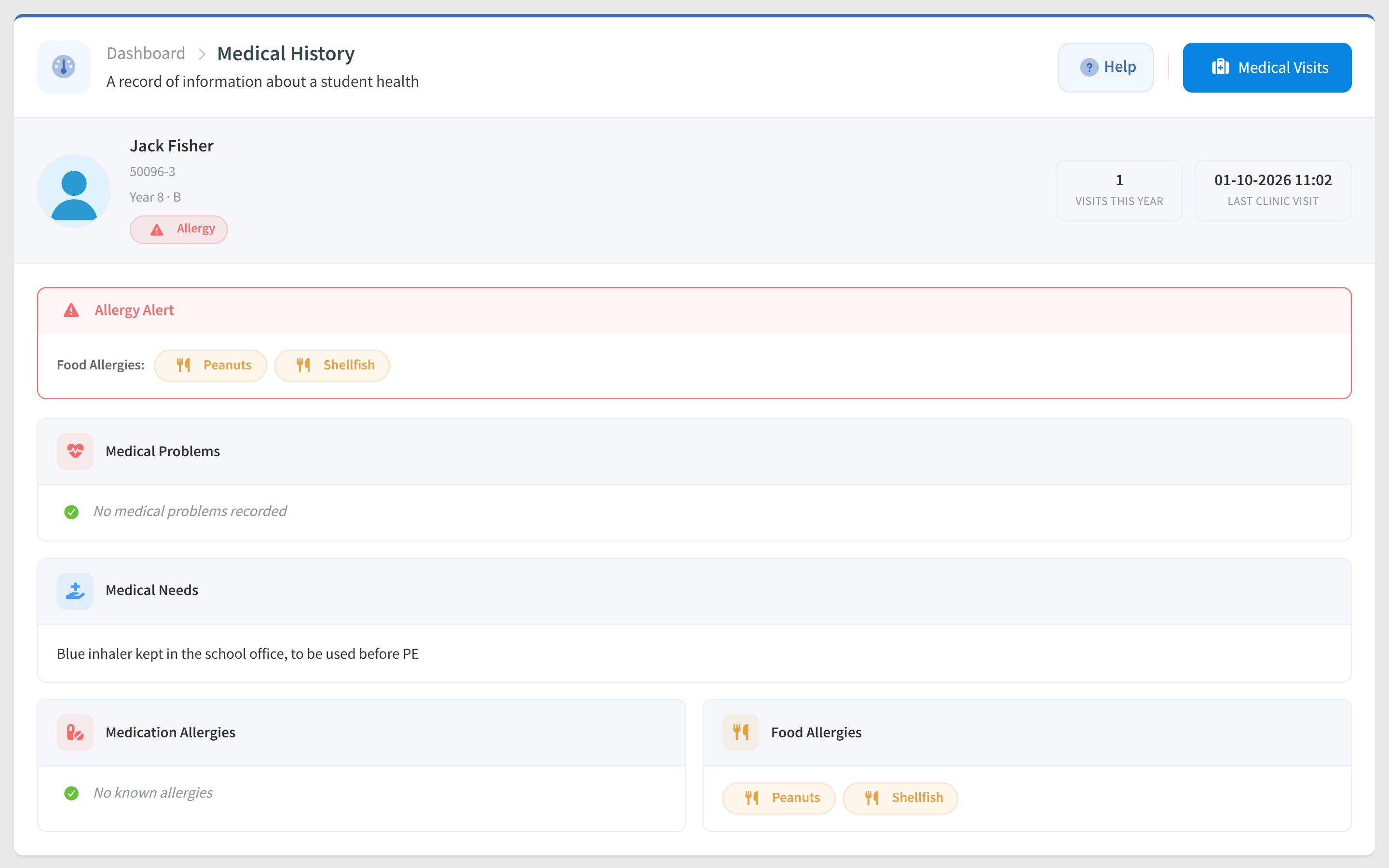
A student's medical history in SCL with an allergy alert for peanuts and shellfish, an inhaler kept in the office, clinic visits this year and the last visit.

Each student carries medical problems, medical needs, medication and food allergies, dietary requirements and any other notes staff should have. Where allergies are recorded the profile opens with an allergy alert rather than burying it in a field, and a student with nothing recorded is clearly marked All Clear. Because access is granted per group, a nurse can hold medical detail without seeing a single grade, which is exactly what role-based permissions are for.

Parents are part of keeping it accurate. Where your school allows it they update their child's medical details themselves from the parent portal or the mobile app, every change is written to the log, and administrators are notified when a record moves. The same record carries the child's attendance and their report cards, because it is one system rather than several stitched together.

Student Medical Profile

Each student record holds medical problems and needs, medication and food allergies, special dietary requirements and any other notes staff should have. It sits with the rest of the student's record rather than in a separate file.
Allergy Alert

Where allergies are recorded, the profile leads with an allergy alert instead of hiding it among the fields. A student with nothing recorded is marked All Clear, so staff can tell the difference at a glance.

Clinic Visit Log

Record each visit with its date and the treatment given, and the log keeps the name of whoever recorded it. Visits build a timeline for the year, and a dashboard chart shows how busy the clinic has been.

Parents Keep It Current

Where your school allows it, parents update their child's medical details from the parent portal or the mobile app. Every change is written to the log and administrators are notified.

Visits Parents Can See

Schools can let parents view their child's clinic visit history alongside the medical profile, in the app or the portal. It is a separate permission, so you decide whether to open it at all.

Privacy by Permission

Teachers can see medical history by default, and a school that wants them kept out switches it off in Clinic settings. Parent, teacher and staff access are separate permissions, and every edit is recorded against a name.

See it in SCL

SCL Today

Visit Records, Analytics and Privacy

Visit Reasons, Outcomes

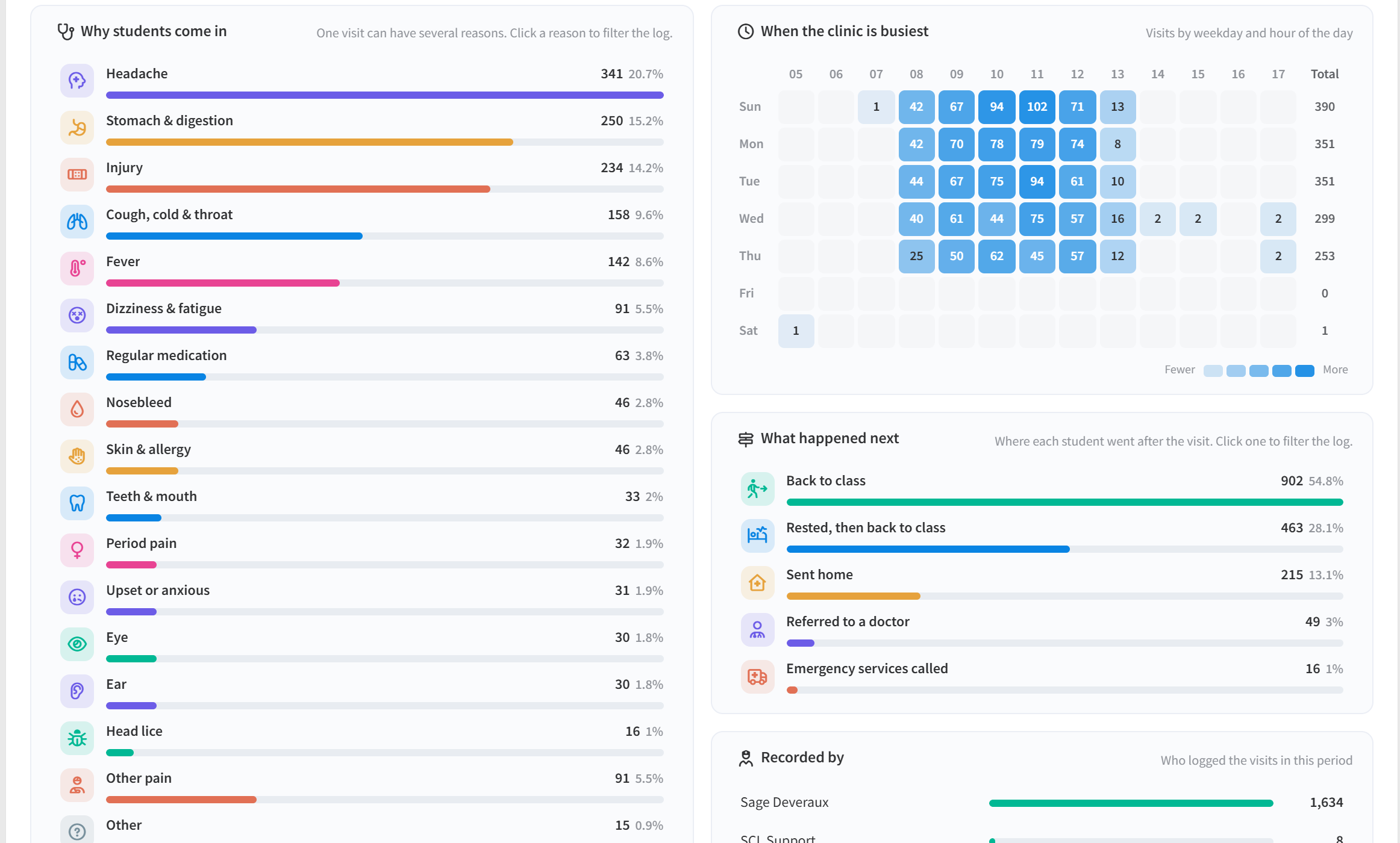
Each clinic visit records its reasons from the school's own list, such as Fever or Injury, and one outcome, such as Back to class, Sent home or Referred to a doctor. Both can be made required, so every visit is counted the same way.

Clinic Visits Report

The Clinic Visits report shows visits, students seen, visits per clinic day, referrals and return visits, with the reasons, the outcomes and a weekday-by-hour heatmap of the busiest times. Visits per 100 students compare levels of different sizes fairly.

Frequent Visitors Flagged

The report lists the students who keep coming back, with their last visit and a flag when an allergy or condition is on file, and each name opens the child's visit history. The nurse sees the pattern behind repeat visits early.

Choose What Parents See

Schools decide separately whether parents see clinic visits at all, the reasons for each visit, and its outcome, such as sent home. Staff always see the whole visit, and families see exactly what the school chooses to share.

Medical Notes in Class

Where the school allows it, teachers open the allergies, conditions and medication of the students they teach from the gradebook and the class attendance register. The option appears only for students who have something on file.

Clear Yes or No Answers

Each medical question asks Yes or No before the details, so an answer like none or N/A is stored as No instead of raising a false allergy alert. An unanswered question shows as Not answered, so staff can tell missing details from a clean record.

Connected modules

Works Hand in Hand With

These modules share the same student record, so what happens in one shows in the others.

See Every Student's Health Record in One Place

Walk through the student medical profile, allergy alerts and the clinic visit log with our team, and see exactly who in your school can view or update each part.