
Skip to the content

Report Cards

A Report Card for Every Curriculum You Run

SCL Report Cards give principals and coordinators one place to produce every student's end-of-term report, whatever curriculum each division follows. American, British, Egyptian and IB divisions each work from templates built for how they grade, so a school running more than one programme still issues one consistent, professional report.

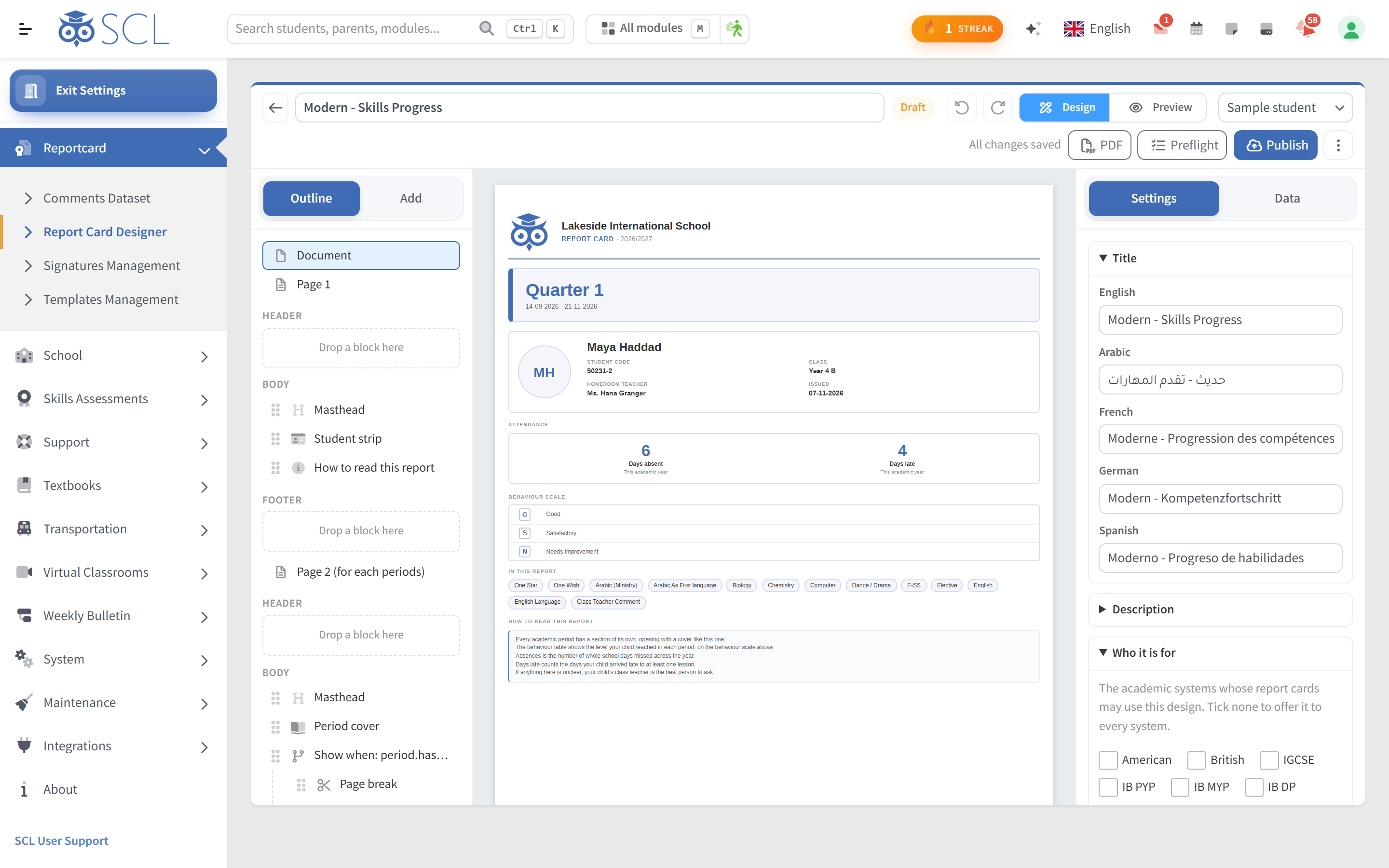
The SCL report card designer for academic staff, with the document outline, a live preview of a student's report card and settings for titles in several languages.

Report cards build straight from the grades, comments, attendance and behaviour your teachers already record. Admins generate a whole academic period in the background, review or correct any student, then print a year group or download every card as an archive foldered by division, grade and class.

Parents and students open the finished PDF in the portal and mobile app, with visibility you control per division and per student. The result is less paper chasing for your office and a clear, on-brand record that families can trust.

A Template for Every Curriculum

American Curriculum

American divisions choose the K12 layouts, Default, Detailed or with a cover page, or a Modern card such as Transcript & GPA or the landscape High School report of each course's marks, exam, lates and learning behaviours. Honors and AP courses weight the GPA automatically.
British Curriculum

British divisions choose the British Curriculum layouts, from Default and Detailed to Keystage 5 and progress reports with comments, or Modern cards such as Effort & Comments and Early Years. An IGCSE division can print the Modern High School and Skills Progress cards too.

IB PYP, MYP and DP

PYP grades print the official PYP card by default, a booklet per term with the units of inquiry and approaches to learning, and criteria-graded MYP grades the official MYP card, with each criterion's level from 0 to 8 by period, the criteria total and the 1 to 7 grade. Diploma divisions choose IB Default or IB Descriptor Automatically Calculated, which turns each mark into its IB grade.

Egyptian National

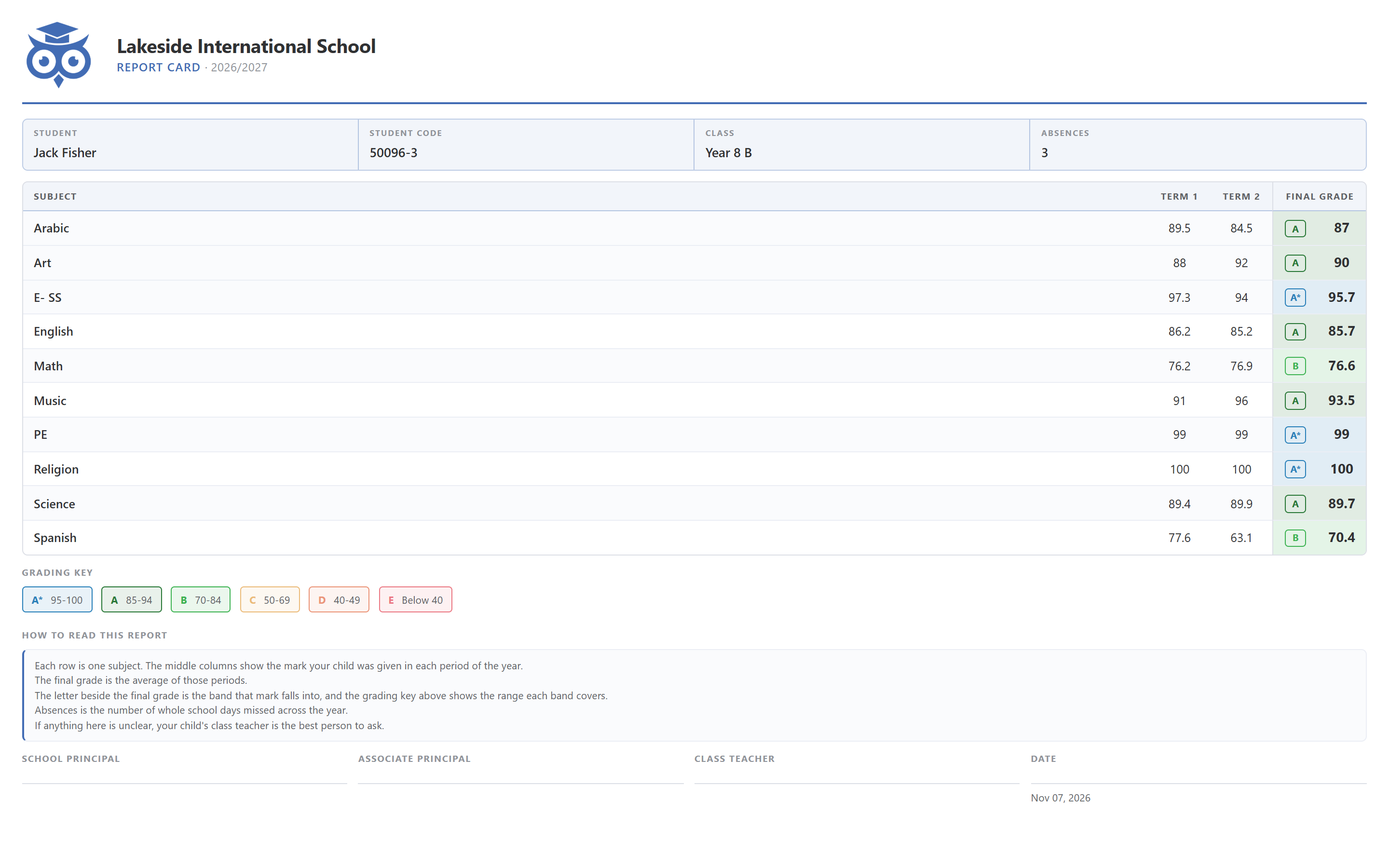
Egyptian divisions choose the Egyptian Default layout, a combined layout that shows the gradebook and skills assessments side by side, or the Modern Single Sheet and Term Comments cards. Modern cards print every label in your school's language, Arabic included.

See it in SCL

SCL Today

Report Cards Your School Designs and Approves

Report Card Designer

Build your own report card page by page from ready-made blocks such as the marks table, grading key and signatures, plus your own pictures and text in each language you print in, then publish it as a template for your grades. Coordinators get exactly the card the school wants.

Comments Review

Principals and coordinators read each set of subject and general comments, correct them, then approve them or return them to the teacher with a note, and every correction is kept with its before and after text. Where approval is on, families see comments only once approved.

Preflight Checks

Preflight draws every report card of a grade from the saved design, exactly as the PDF will print, and lists cards that run past their sheet limit, lack comments or still have comments awaiting approval. Coordinators fix problems before a single family opens a card.

Modern Layouts per Grade

Each grade gets its own layout and settings such as text size, percentages or grading-scale letters, achievement levels in colour, absences by type, class attendance and the student photo. A preview draws the card with your own subjects, periods and signatures before anything is saved.

Skills, ATL and Promotion

Skills cards rate every skill on your own scale with earlier periods beside the latest, the MYP card adds approaches to learning ratings, and a period cover can show the promotion status the homeroom teacher set. Parents see progress through the year, not one mark.

Signatures, Grading Keys

On Term Comments cards, signing lines print under the marks, at the end or under every term, and the grading key shows each band in its colour with what it means. A How to read this report note, in plain sentences or your own words, helps parents read the card without calling the school.

Cards Become Transcripts

Each report card year can be kept as a transcript record, corrected cell by cell and synced again when the card changes, and transcript versions set the layout, official course names, language and school statement. Registrars print one student or a whole grade in one PDF.

Generate Early

When cards must go home before a period ends, administrators generate them early after a warning that names the end date, and the period is marked Generated early. Schools keep their real period dates and still meet the date families expect.

Progress Reports

Subject teachers rate each student on the columns your school defines, such as readiness for class or classroom behaviour, and add their comments. Send to Parents delivers every student's progress report PDF as a message, and families read it between report cards in the portal and the app.

Everything a Report Card Should Show

Grades, Letters and GPA

Templates map every score to a percentage and letter grade through your own grading scale, then roll academic periods up into semester and year averages. Where your scale uses it, a credit or session weighted GPA is calculated automatically.

Comments and Effort

Comment-led cards carry a per-subject effort mark and each student's written comments. Each division defines its comment fields, teachers write every comment themselves, and Comments Review keeps tone and wording consistent across the whole staffroom.

Attendance and Behaviour

Each card can show total days of absence, a breakdown by absence type and the student's behaviour score, so conduct and attendance sit beside academic results. Families see the whole picture, not just the marks.

Signatures and Logo

Every report card carries your school logo and name, a grading-scale legend and the signatory lines you set for each division. The printed PDF looks official the moment it leaves your office.

Built for the Whole School

Whole-Period Generation

Admins generate every student's report card for an academic period in a single background run, or rebuild one student after a correction. Cards build from the grades, comments and attendance already in SCL, so nobody retypes a mark.

Review and Grace Marks

Open any generated card to correct a mark before it goes out. Grace Marks lists a grade's students who narrowly missed the pass mark, within the band you set, and you award each one deliberately, seeing every score before and after.

Print and Download

Print a whole year group as one PDF, or download every card as a single archive foldered by division, grade and class. End-of-term printing stops being a day at the copier.

Access You Control

Parents and students open the finished report card in the web portal and mobile app as a clean PDF. You decide who sees it with global, per-division and per-student switches, so a division's cards appear only when you turn them on.

Connected modules

Works Hand in Hand With

These modules share the same student record, so what happens in one shows in the others.

See Your Report Cards Before They Go Out

Walk through the curriculum templates, whole-period generation and the review and grace marks step with our team, and see how grades, comments, attendance and behaviour land on one report card.