
Skip to the content

Training & Support

Support That Knows Schools

From the first training day to the last report card of the year, everyone at your school has a way to learn SCL and a team to call: training at school and online, a Help menu with the page's guide on every page, guided tours and short videos on many pages, the Help Center's guides for every role, phone support and, where your license includes it, Priority Support.

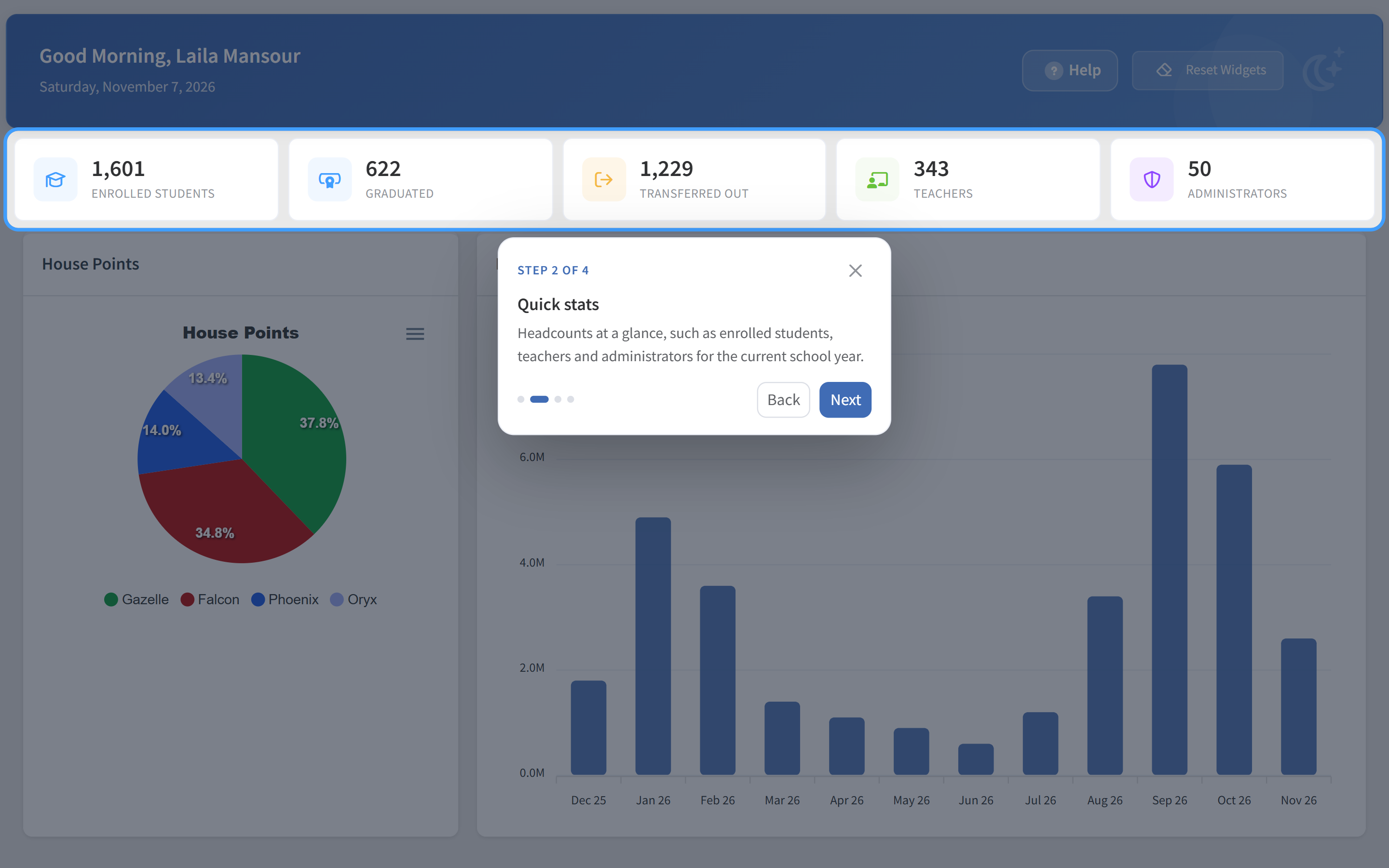
A guided tour in SCL walking an administrator through the dashboard, with the quick stats highlighted and a popup explaining them, step 2 of 4.

Training

Training for Every Role

Administrators, coordinators, teachers, parents and students each learn the screens they use, in the way that suits them.

Training at Your School

Our team trains your staff on site, role by role. Teachers start with a two-hour Introduction to the daily basics and go further in a five-hour Workshop, and administrators have a two-hour Introduction that sets up the school in the order SCL needs. Each session follows the trainer's checklist, so the essentials are always covered.
Online Training

Live online sessions for new staff, new modules and the start of each term, without waiting for the next visit.

Guides and Handbooks

The Help Center explains each task step by step, written for the role that does it: administrators, teachers, parents and students. The Teacher and Admin Handbooks gather those guides into a book for each role, in the order training teaches them, to read offline, in print or on screen.

Tutorials and Videos

Short videos show a page at work and play on their own the first time someone opens a page that has one, so a new teacher can watch a task once and then do it.

Inside SCL

Help on Every Page

Help is where the work is. Every page has a Help menu with the page's guide, and many pages a guided tour and a short video. With SCL Connect on, staff can also ask the Help Center a question and get step-by-step answers from SCL's own guides.

  • A Help menu on every page
  • Ask the Help Center a question
  • Guided tours and videos on many pages
  • Request Support from the Help menu
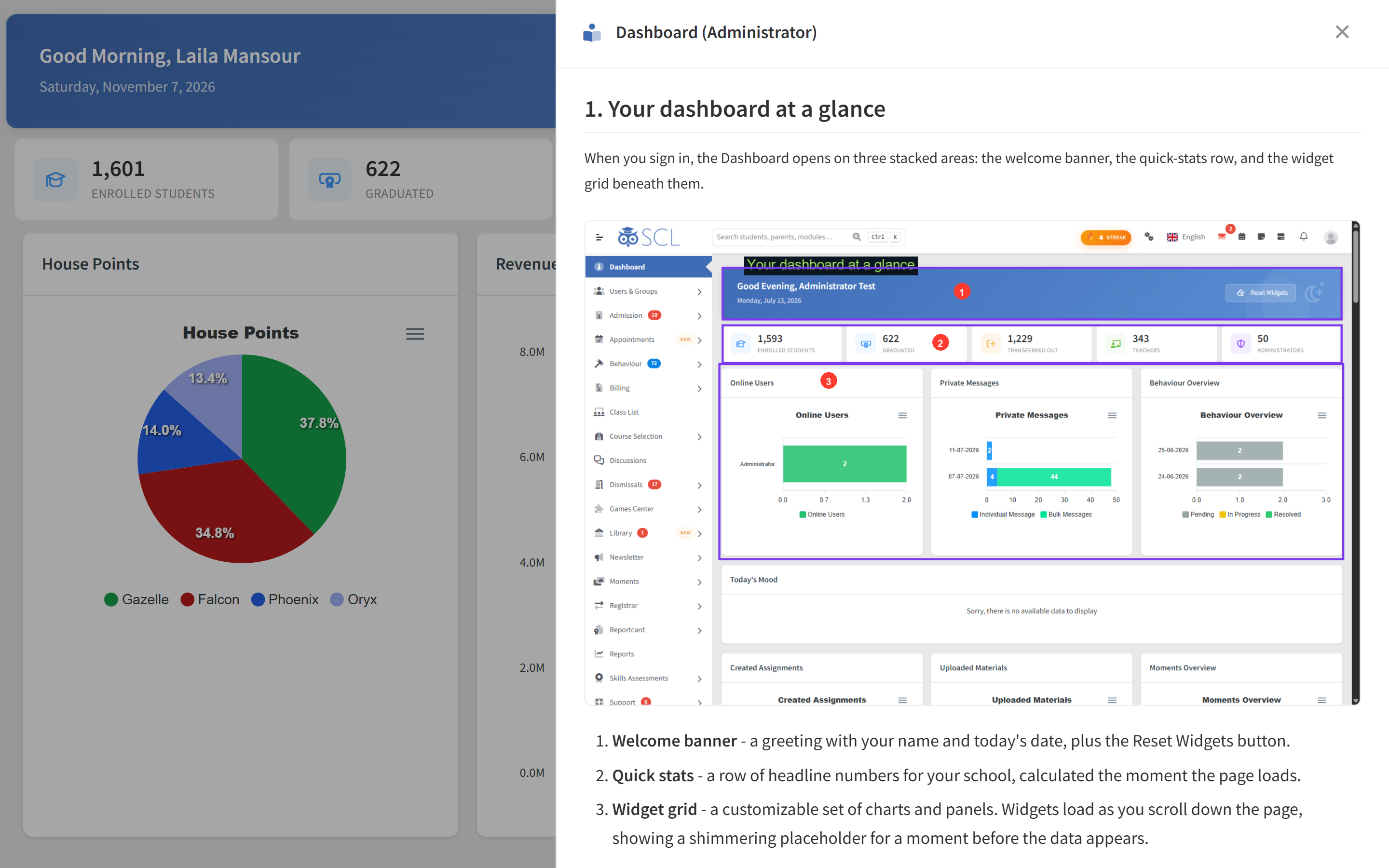
A Help Center guide opened inside SCL in a side drawer, explaining the dashboard with an annotated picture and a numbered list of its three main areas.

Tutorials

Watch It Once, Then Do It

A tutorial plays right inside SCL, over the page it explains, so nobody leaves their work to learn it.

  • Played without leaving SCL
  • Watch again any time from Help
  • Also on SCL's YouTube channel
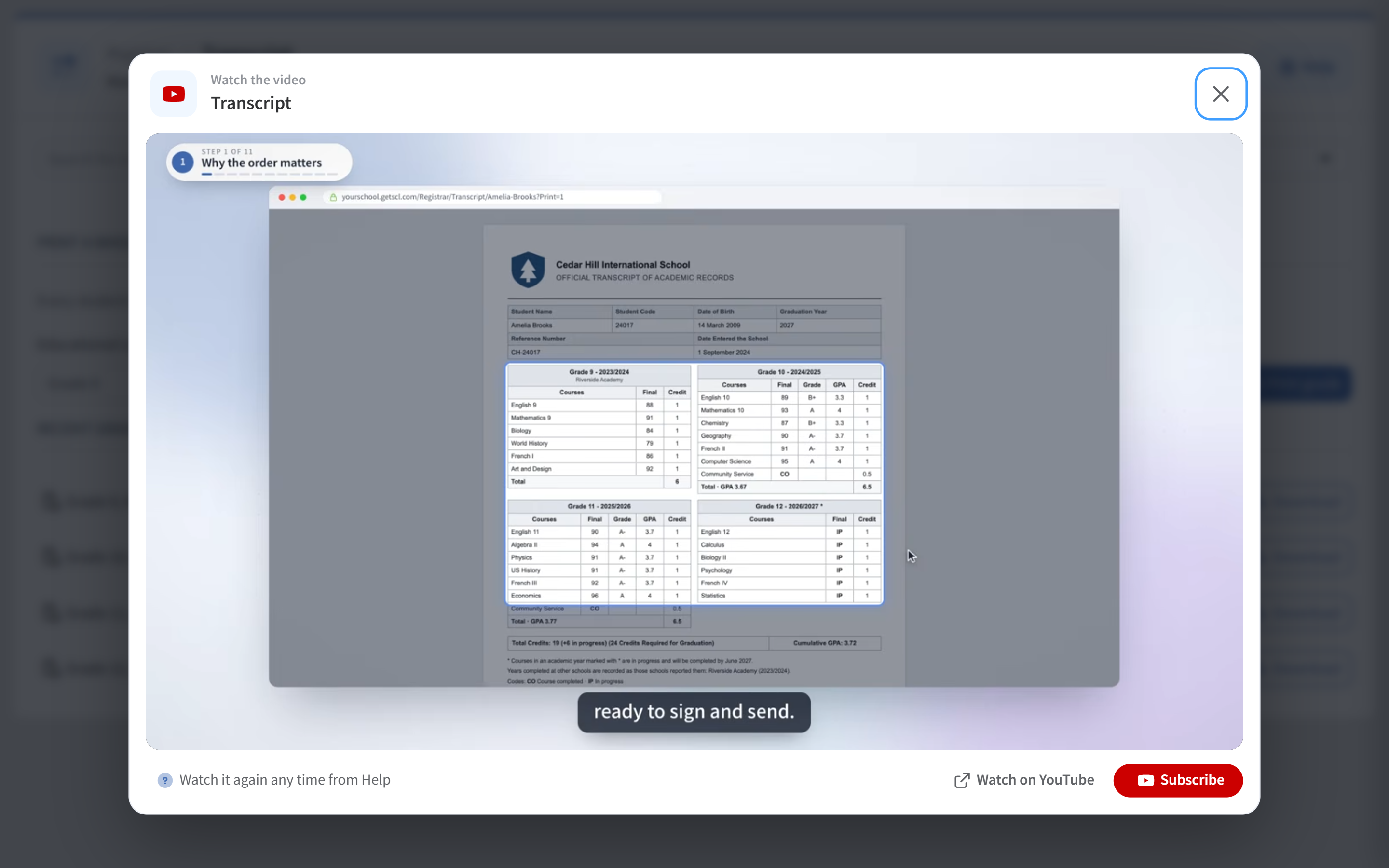
A short tutorial video playing inside SCL from the page's Help menu, walking through printing a transcript step by step with captions on screen.

People

A Team You Can Reach

Phone Support

Call our team and talk to someone who knows schools. When it helps, you can give SCL Support secure access to your platform for 7, 15, 30 or 90 days and withdraw it at any time, and a one-time PIN confirms who you are on the call.

Tickets Started From SCL

Choose a topic on Request Support and the SCL help desk opens in a new tab with your school, your name and your email already filled in, so you only write the message. Our team gets back to you promptly.

Priority Support

For schools whose license includes it: hands-on help to customize and adjust your reports, report cards, forms and more, so SCL fits the way your school works.

SCL Portal

A Community That Shapes SCL

SCL Portal is where schools ask the community, find answers others have shared and follow the roadmap. Every member of your staff can contribute to what comes next.

  • Community questions and answers
  • A roadmap your staff can contribute to
Visit SCL Portal

From the First Day to Every Day

  1. Trained at launch

    Your staff are trained at school and online, role by role.

  2. Guided from inside

    Page guides, guided tours and Ask the Help Center answer most questions on the spot.

  3. A team when you need one

    Phone support, tickets and, where your license includes it, Priority Support for the bigger changes.

  4. A voice in the roadmap

    Ask and share in SCL Portal, and contribute to the roadmap.

Training and Support Questions

How do new staff learn SCL?

Through training at your school and online, the Help menu with the page's guide on every page, guided tours and short videos on many pages, and the guides for their role in the Help Center.

Can you help us adjust our report cards and reports?

Yes, where your license includes Priority Support: it helps you customize and adjust reports, report cards, forms and more.

Can we reach a person by phone?

Yes. Call our team. When it helps, you can give SCL Support secure access to your platform for 7, 15, 30 or 90 days, and withdraw it at any time.

Where can we suggest a feature?

In SCL Portal, where every member of your staff can ask the community and contribute to the roadmap.

See What SCL Will Do for Your School

Book a live demo and we will walk you through admissions, the gradebook, billing and the parent app with your own school in mind, then shape a plan that fits.