School Admissions Software: Apply, Assess, Enroll

Online Applications, Assessment Booking, Fee Payment and One-Click Enrollment

From Application to Enrolled Student

Admission is the first thing a family experiences of your school, and in most schools it still runs on paper forms, spreadsheets and phone calls. SCL puts the whole intake online: parents apply from any device, pay the application fee as they submit, and follow their child's progress from a private tracking link without calling the office. Your admissions team works one list. Every applicant moves through four phases, Application, Assessment, Interview and Fee Payment, with your own colour-coded statuses on top, and each user group can be locked out of the phases it has no business changing. When a family is accepted, one click turns the applicant into an enrolled student. The parent account and family code are created, contacts and medical details carry across, uploaded documents follow, and any invoices already raised move with them.

Online Application Form

Parents apply from a phone, tablet or laptop through a four-step form covering the student, parents, medical details and a final review. No account is needed and nothing has to be printed.

Your Form, Your Fields

Decide every field on the application form: what appears, what is required, what must be unique and how wide it sits. Group fields under student, parent, guardian, emergency, medical or a section of your own.

Four Admission Phases

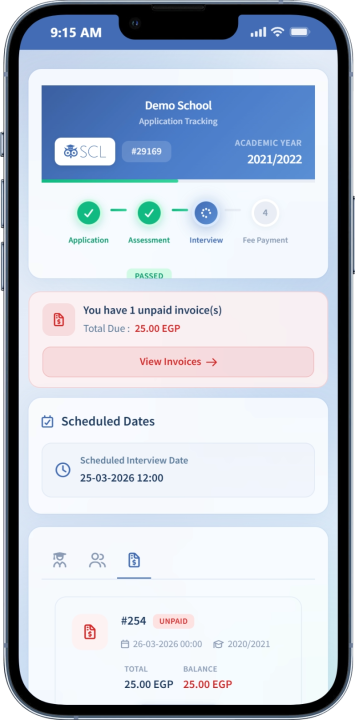
Every applicant moves through Application, Assessment, Interview and Fee Payment, so nobody has to ask where a family has reached. Each user group can be blocked from the phases it should not be changing.

Assessment Booking

Publish assessment slots with a capacity for each and let applicants pick a time as they apply. Full slots disappear on their own, and staff can still assign a date by hand when a family needs one.

Pay the Application Fee Online

Set an application fee per grade and collect it through your payment gateway as the family submits. Unpaid applications expire on a schedule you set, so the list you are working stays real.

Applicant Tracking Portal

Every applicant gets a private link showing their status, timeline, scheduled dates and uploaded documents. Families settle outstanding invoices from that same page instead of phoning the admissions office.

Statuses That Match Your Process

Define your own applicant statuses with their own colours, and change them in bulk across a whole cohort. The list sorts new applicants to the top so nothing sits unnoticed.

Know Where Applicants Come From

SCL records the campaign and the referring site that brought each family to your form. Marketing spend can finally be judged against applications actually received rather than guessed at.

Documents on File

Families upload supporting documents with the application, and staff add more to the record later. Everything a family sent follows the student automatically once they are enrolled.

One-Click Enrollment

Turn an accepted applicant into an enrolled student record in one click. SCL creates the parent account and family code, carries over contacts and medical details, copies the documents and moves any invoices across.

Admission Emails and Messages

Admission mail goes out from its own sender identity, separate from the rest of the school. Ready templates cover receipt, assessment booking, decisions and enrollment, and each one is editable.

Admission Reports

See the intake by grade and phase, and build your own applicant list from any field on the form. Sort it, filter it and export to Excel, CSV or PDF.

See It Live

See Every Applicant Through to Enrollment

Walk through the online application form, assessment booking and fee payment with our team, and see how a completed application becomes an enrolled student in a single click.